




Cloud Trade Copier for Real Trading Workflows

Cloud Trade Copier for Prop Firms, Signals, and Multi-Account Traders

Copy trades across MT4, MT5, DXtrade, TradeLocker, MatchTrader and cTrader, and follow Telegram as a signal source. Manage accounts, billing, and visibility from the web app. No desktop app to keep open and no Windows VPS to rent or maintain.

  • cTrader
  • DXtrade
  • MetaTrader 4
  • MetaTrader 5
  • MatchTrader
  • TradeLocker
  • Telegram

Create your account free  ·  2 account licences required to begin

Six trading platforms, plus Telegram as a signal source

MT4, MT5, TradeLocker, DXtrade, MatchTrader and cTrader execute trades. Telegram feeds signals. See the Supported Platforms hub for connection methods.

Built for prop firm accounts, signal automation, and serious multi-account copying

01

Prop Firm Traders

Copy from your own setup into funded accounts with cloud execution managed from the web app.

  • Works across MT4, MT5, TradeLocker, DXtrade, MatchTrader, and cTrader
  • No desktop app or Windows VPS required
  • Copy across multiple prop firms at once
02

Signal Followers

Auto-execute Telegram signals. Parse supported Telegram formats into follower trades on connected trading accounts.

  • Reduce manual retyping of channel signals
  • Supports TP1, TP2, TP3, TP4, TP5 levels
  • Configurable keywords, aliases and multi-TP rules
03

Multi-Account Managers

Trade once, copy everywhere. Connect more accounts as your setup grows.

  • Add master and receiver accounts as you grow
  • Per-connection sizing including Balance Multiplier
  • Manage links from the web app

Platforms, use cases, and how cloud copying fits your setup

Supported Platforms

See where DaneTrades connects today and how those platforms map to typical master and receiver setups.

Supported Platforms hub

Prop Firm Trade Copier

How DaneTrades fits prop firm and funded account copying when you want cloud execution across multiple accounts.

Prop firm use case

Local vs Cloud Copier

See how cloud copying compares to installed local copiers, without the noise.

Local vs cloud comparison

cTrader Trade Copier

See how DaneTrades fits cTrader masters and receivers when you want multi-account control from the web.

cTrader Trade Copier

DXtrade Trade Copier

Explore how DaneTrades fits funded and evaluation workflows built around DXtrade accounts.

DXtrade Trade Copier

MatchTrader Trade Copier

See how cloud copying, sizing, and account control fit MatchTrader-based prop and broker setups.

MatchTrader Trade Copier

Your copier keeps running when your computer is off.

DaneTrades runs in the cloud, so there is no desktop app to keep open and no Windows VPS to rent or maintain.

cTrader DXtrade MatchTrader MT4 MT5 Telegram TradeLocker

Why cloud copying matters

  • Copying continues when your laptop sleeps
  • Manage accounts and copiers from any browser
  • Fits manual trading, automation, and prop account copying

Connect in a few simple steps

Create an account, connect supported platforms, then build master and receiver links with sizing and mapping.

1. Create Account

Create Account

2. Connect

  • Choose platform
  • Select master and receiver accounts
  • Save the configuration

3. Start Copying

Copying active

Manage links from the web app

Connect your signal sources and trades execute automatically

Telegram Signals

Connect any Telegram channel

Configure detection for BUY, SELL, SL and TP style messages, then route into trading-account receivers.

  • Auto-detects BUY / SELL / SL / TP
  • Multi-TP support from TP1 to TP5
  • Customisable format handling

Risk controls, sizing, and symbol mapping built in

  • Balance multiplier for automatic scaling
  • Lot multiplier and fixed lots
  • Risk % and Risk $ modes
  • Custom symbol mapping across brokers and platforms

Risk & Sizing

Balance Multiplier

Scale follower size relative to balances when accounts are unequal. Confirm the mode that fits each link.

Symbol Mapping

Broker symbol translation

GOLD to XAUUSD, NAS100 to USTEC, plus custom mappings you can save and load.

Master and follower copying with full control

A master generates trades. Receivers follow according to each connection’s sizing, symbol mapping and filters. Safe mode can block new opens; disabling a link pauses that relationship. Existing receiver positions remain your responsibility unless another setting manages them.

Position sizing

Balance Multiplier, Lot Multiplier, Fixed Lots, Risk % and Risk $ are documented in Help for unequal account balances.

Sizing modes explained

Symbol mapping

Map master symbols to receiver broker names when suffixes or aliases differ.

Symbol mapping fixes

Filters and safe mode

Constrain symbols, sessions and protection rules, or pause new opens without deleting the link.

Filters explained

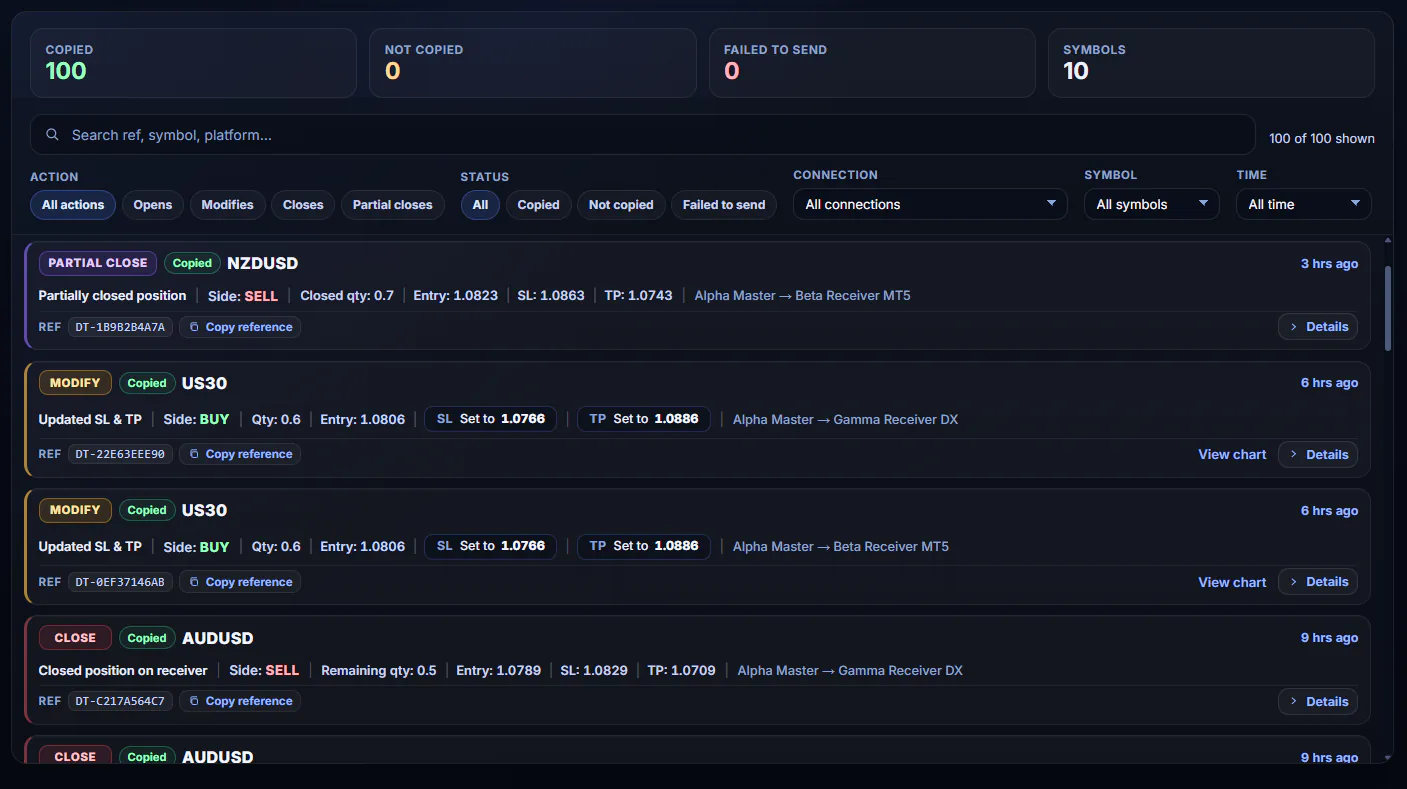
See follower outcomes clearly

Trade Activity helps you review what happened on each follower after a master event, so diagnosis does not rely on guesswork.

DaneTrades Trade Activity
DaneTrades performance analytics

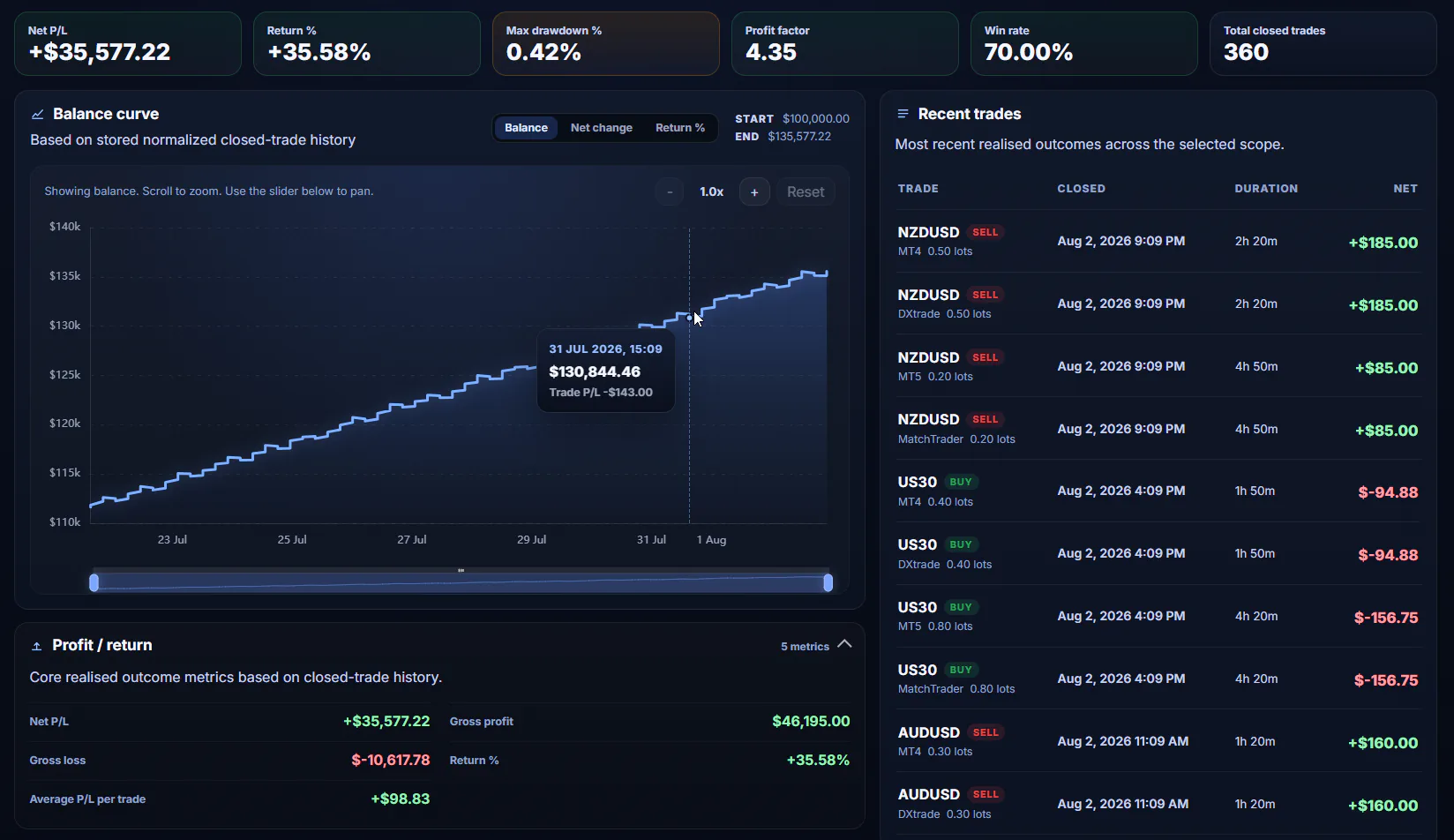
Analytics for multi-account review

Use performance and exposure views in the product to review how connected accounts are behaving over time. No invented return or uptime claims.

Context beside your copier workflow

Market insight views sit alongside the cloud copier so you can review market context without leaving the product.

DaneTrades market insights

Cloud operation without a personal VPS

DaneTrades runs the cloud copier so you manage accounts and settings from the web app. You do not need to keep a personal PC or Windows VPS online for the cloud product flow. Platform-specific connection methods (for example MetaTrader EA paths) still follow their Help Centre requirements.

Open the page for your stack

Clear pricing, cloud availability, and full control from the web.

Pay for Connected Accounts

Each connected trading account uses one licence. Start with two accounts, then add more whenever your setup grows.

Runs in the Cloud

No desktop app to leave open and no Windows VPS to rent or maintain. Your copier keeps running when your computer is off.

You Stay In Control

Stop or pause copying from the web app. Manage settings and accounts from any browser.

Operational visibility without guesswork

Execution Timing

Review copy outcomes and timing details in Trade Activity and Logs so you can diagnose follower results.

Copy Health

See warnings when an account, connection, or copier needs attention.

Statistics

Review copied trades, volume, and platform distribution in one place.

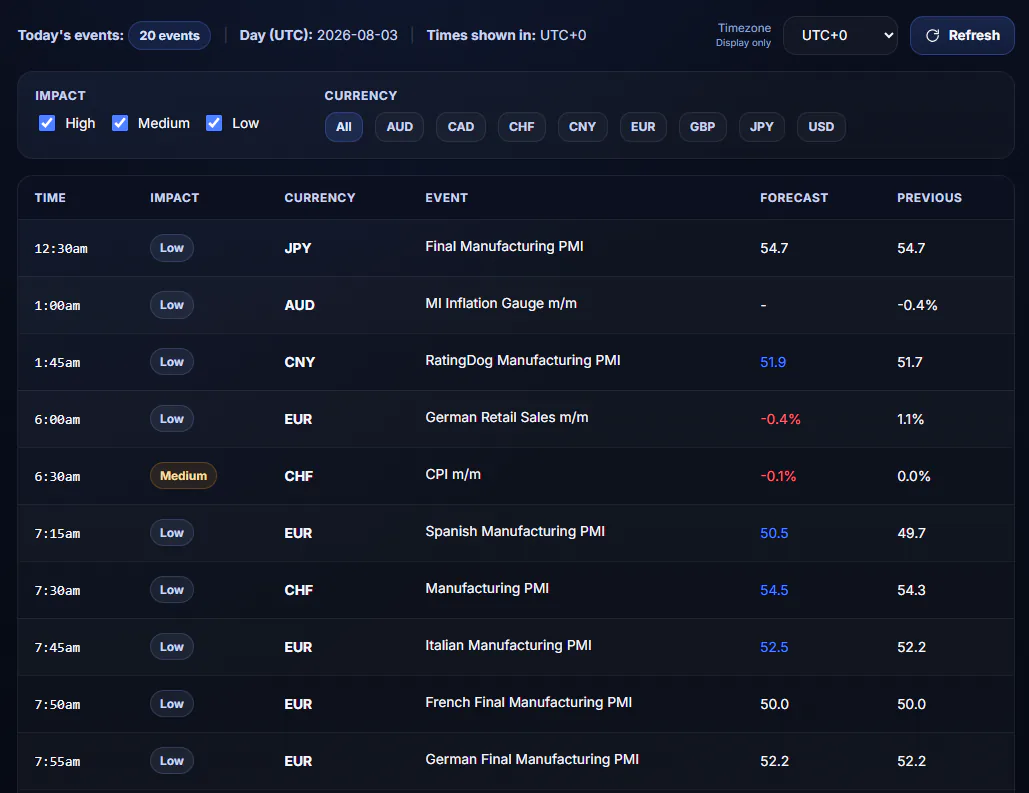
Stay ahead of market-moving events

Filter by impact level and currency, then automatically block trades around high-impact news.

  • Live calendar with today’s events at a glance
  • Impact filtering for high, medium, or low impact
  • News filters to block copying before and after announcements

Economic Calendar Today

  • 08:30 US Non-Farm Payrolls High
  • 10:00 US ISM Services PMI Med
  • 14:00 GB BoE Interest Rate High

Safety rules that help you stay in control

Safe Mode

Close-only mode blocks new positions while existing trades close normally.

Schedule Filters

Block trades during rollover, weekends, or volatile trading windows.

Per-Connection Control

Enable, disable, or configure each connection individually with full flexibility.

Also trading manually?

If you place trades directly inside MT4 or MT5, the DaneTrades Trade Manager can help you calculate risk, manage entries, move stops to break-even, take partials and control daily limits from one panel.

The trade copier that runs in the cloud.

Managed from the web without keeping a personal PC or Windows VPS online for the cloud product flow. Account-based pricing.

Create your account free  ·  2 account licences required to begin

Cloud trade copier questions

How much does DaneTrades cost?

Account licences cost $10 per connected trading account each month. Minimum setup is 2 connected accounts for $20 per month. Each Telegram channel also uses 1 licence slot.

Is there a free cloud trial?

No. You can create a DaneTrades account for free, but there is no free cloud copier trial and no yearly plan.

Which platforms are supported?

Trading platforms: MT4, MT5, TradeLocker, DXtrade, MatchTrader and cTrader. Telegram is a signal source, not a trading platform.

Do I need a Windows VPS?

No personal PC or Windows VPS is required for the DaneTrades cloud product flow. Some connection methods, such as MetaTrader EA paths, still require the terminal conditions described in Help.